


Auto Parts WordPress Theme Features for Creating a More Organized Store
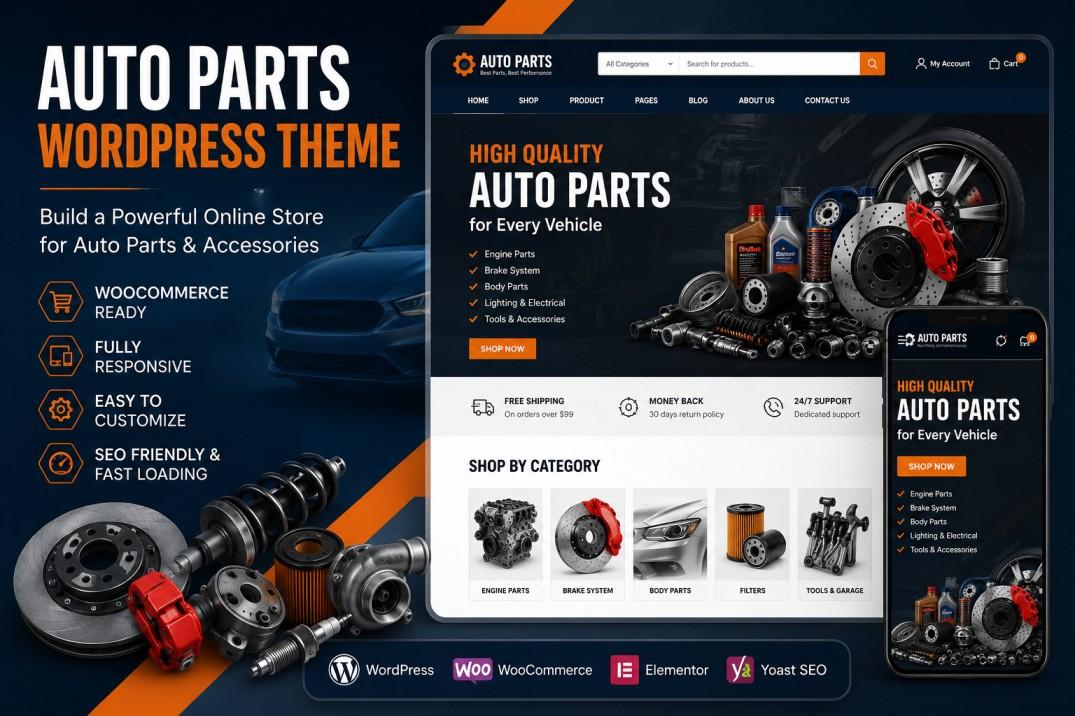
Walk into a messy, disorganized auto parts store in real life, and you'll probably turn around and leave before even asking for help. The same thing happens online, except instead of walking out the door, customers just close the browser tab. An auto parts website with thousands of products needs a level of organization that goes beyond just having categories, it needs a structure that guides customers smoothly from the homepage all the way to checkout. A well-built auto parts WordPress theme gives you the tools to create that kind of organized experience, rather than leaving customers to figure things out on their own.
Let's look at what actually makes an auto parts store feel organized, and how the right theme supports that from top to bottom.
Why Store Organization Affects More Than Just Looks
It's easy to think of organization as purely a visual thing: clean layouts, matching colors, tidy spacing. But for an auto parts store specifically, organization affects something much more practical: whether customers can actually complete their shopping task without giving up halfway through.
A disorganized store forces customers to work harder than they should just to find, compare, and purchase what they need. That extra effort is exactly what drives people to abandon their cart or leave your site entirely.
The Domino Effect of a Messy Store Layout
When a homepage doesn't clearly guide visitors toward what they need, they end up wandering aimlessly or relying entirely on search, assuming your search function even works well. If search also falls short, customers hit a dead end and leave, often without ever realizing you actually carried the part they needed.
Key Features That Create a More Organized Store
Here's what a properly built auto parts theme brings to the table when it comes to overall organization.
Logical Homepage Structure
A well-organized homepage doesn't just show a giant banner and call it done. It highlights major categories, featured products, and quick links to popular searches like "brakes" or "batteries," giving visitors an immediate sense of direction the moment they land on your site.
Strong Global Navigation Menu
Your main navigation menu should act like a map of your entire store. A theme that supports clear, organized dropdown menus lets customers browse by category without needing to rely on search for every single thing they're looking for.
Powerful Search With Smart Filters
Since auto parts customers often know exactly what they need, a strong search bar with autocomplete suggestions and filtering options helps them go from typing a query to viewing relevant results almost instantly.
Consistent Page Layouts Throughout the Site
When every page, whether it's a category listing, product page, or blog post, follows a consistent design pattern, customers don't have to relearn how to navigate every time they move to a different section of your store.
Organized Footer With Helpful Links
A cluttered or empty footer wastes valuable space. A good theme structures the footer with helpful links like shipping policies, return information, popular categories, and contact details, giving customers an easy way to find information without scrolling back up.
Design Choices That Reinforce a Clean, Organized Feel
Beyond individual features, certain design habits help tie everything together into a store that feels genuinely well managed.
Balanced Use of White Space
Cramming too much onto one page overwhelms visitors, especially on a site with as many products and categories as an auto parts store often has. Proper spacing between sections helps everything feel more breathable and easier to scan.
Clear Visual Hierarchy
Headings, subheadings, and important buttons like "Add to Cart" should stand out clearly from surrounding content. A theme with strong visual hierarchy makes it obvious what customers should focus on at each step of their visit.
Predictable Button and Link Placement
If your "Add to Cart" button appears in a different spot on every page, it creates unnecessary confusion. Consistent placement across your entire store makes the shopping experience feel smoother and more intuitive.
Mobile-Friendly Organization
An organized desktop layout doesn't automatically translate well to mobile. A theme that reorganizes menus, filters, and product displays properly for smaller screens keeps that same sense of order intact no matter what device someone is using.
Read More: Best Industrial WordPress Themes: Complete Guide for 2026
Common Organization Mistakes Auto Parts Stores Make
A few recurring issues tend to make stores feel more chaotic than store owners realize.
Overloaded Homepages
Trying to feature every category, promotion, and product all on one homepage can overwhelm visitors instead of guiding them. Focus on the most important sections and let customers dig deeper from there.
Weak or Basic Search Functionality
If your search bar only matches exact product titles and misses common misspellings or related terms, customers may assume you don't carry something you actually do.
Inconsistent Category Structures
If similar products are organized completely differently across various sections of your site, it becomes hard for customers to predict where to look for what they need.
Cluttered or Empty Footers
A footer stuffed with too many unrelated links, or one that's nearly empty, wastes an opportunity to help guide customers toward useful information or popular sections of your store.
How to Build a More Organized Store Step by Step
If improving your store's overall organization is a priority, here's how to approach it properly.
Map Out Your Site Structure First
Before making changes, sketch out how your categories, subcategories, and key pages connect to each other. This gives you a clear blueprint to follow when setting up your theme.
Prioritize Your Most Popular Categories
Make sure your most frequently searched categories are the easiest to find, whether that's through homepage links, navigation menus, or featured sections.
Test Your Own Search Function
Try searching for products the way a real customer might, including partial names, misspellings, or part numbers, to see how well your current search setup handles imperfect queries.
Review Every Page for Consistency
Go through your site page by page and check whether layouts, button placement, and navigation feel consistent throughout, adjusting any pages that feel out of place compared to the rest.
Conclusion
An organized auto parts store isn't just about looking clean, it's about making sure customers can actually find, compare, and purchase what they need without unnecessary frustration along the way. A well-built auto parts WordPress theme with strong navigation, smart search, and consistent page layouts creates that smooth experience from the homepage all the way through checkout. If you're planning to improve how your store is structured, it's worth exploring premium WordPress templates built with strong organizational features in mind, rather than relying on a scattered setup that leaves customers wandering without direction.
Frequently Asked Questions
1. Why does store organization matter so much for an auto parts website?
Because customers need to quickly find, compare, and purchase specific parts, and a disorganized site makes that process frustrating enough to drive them away.
2. What should a homepage actually include for an auto parts store?
It should highlight major categories, popular searches, and featured products, giving visitors clear direction right from the start instead of overwhelming them with everything at once.
3. How important is search functionality for an organized store?
Extremely important, since many customers search directly for specific parts or part numbers, and weak search functionality can make it seem like you don't carry something you actually do.
4. Does mobile organization need to be handled differently than desktop?
Yes, menus, filters, and layouts often need to be restructured for smaller screens to maintain the same level of organization and ease of use.
5. What's a simple first step to improve my store's organization?
Start by mapping out your current site structure and testing your own search function, since these two areas often reveal the most obvious organizational gaps.

 English
 Arabic
 French
 Spanish
 Portuguese
 Deutsch
 Dutch
Dutch
 Italiano
 Russian
 Romaian
 Portuguese (Brazil)
 Greek
Greek