


Aruba JX939A IAP-304 Wireless Access Point: Features & Benefits
Introduction
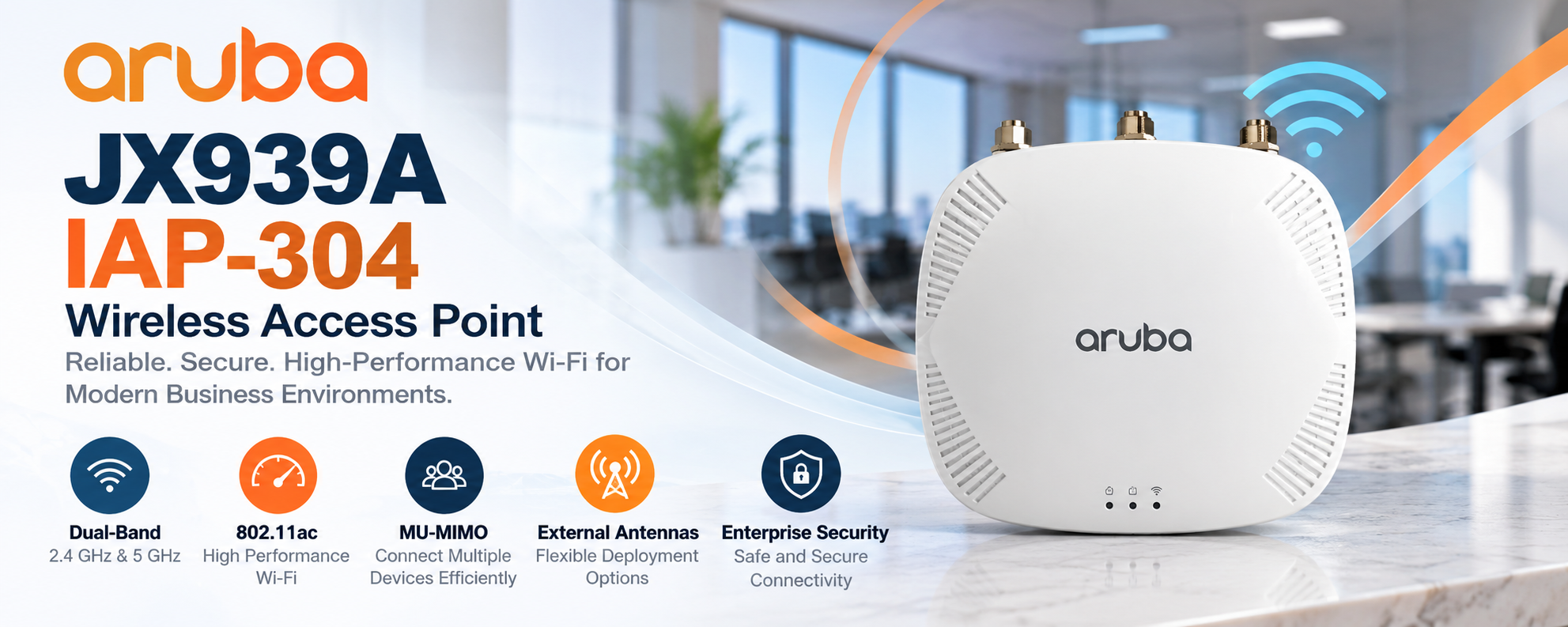
Reliable wireless connectivity is essential for businesses that depend on cloud applications, video meetings, and connected devices. The Aruba JX939A IAP-304 is an enterprise wireless access point designed to provide dependable Wi-Fi connectivity in indoor business environments. With dual-band operation, 802.11ac technology, and MU-MIMO capabilities, it helps organizations manage wireless traffic efficiently.
This guide explains the JX939A's specifications, wireless performance, security capabilities, installation requirements, and practical applications.
What Is the Aruba JX939A IAP-304 Wireless Access Point?
The Aruba JX939A is an Instant IAP-304 wireless access point from the Aruba 300 Series, designed to connect wireless devices to an organization's wired network.
It supports the Wi-Fi 5 (802.11ac) standard and operates on the 2.4 GHz and 5 GHz frequency bands. Its dual-radio design allows businesses to support different types of wireless devices while managing network traffic more effectively.
Unlike standard consumer Wi-Fi equipment, the JX939A is designed for professional network deployments where administrators need greater control over wireless connectivity, configuration, and security.
The access point also features external antenna connectors, allowing network designers to select compatible antennas based on installation requirements.
Key Features of the Aruba JX939A IAP-304
Dual-Band Wireless Connectivity
The JX939A operates on 2.4 GHz and 5 GHz frequency bands, giving businesses flexibility when connecting different wireless devices.
The 2.4 GHz band generally offers better penetration through walls and obstacles, making it useful for devices located farther from an access point. However, this band is often affected by interference from nearby wireless networks and electronic equipment.
The 5 GHz band offers more channel capacity and can provide faster wireless connections under suitable conditions. It is particularly useful for applications such as video conferencing, cloud-based software, and everyday office operations.
Using both frequency bands helps administrators distribute wireless traffic and improve overall network efficiency.
802.11ac Wi-Fi Technology
The Aruba JX939A supports Wi-Fi 5 (802.11ac), which provides improved wireless performance compared with older 802.11n technology.
The access point supports a maximum theoretical combined radio rate of approximately 1.7 Gbps across its two bands. Actual wireless throughput depends on client capabilities, interference, channel configuration, and network conditions.
Although newer Wi-Fi 6 and Wi-Fi 7 access points are available, 802.11ac equipment can still meet the requirements of organizations using compatible devices and established wireless infrastructure.
MU-MIMO Technology
Multi-User Multiple Input Multiple Output, commonly called MU-MIMO, allows an access point to communicate with multiple compatible wireless clients more efficiently.
The JX939A features 3x3:3 MU-MIMO capability on its 5 GHz radio, helping improve the use of available wireless capacity.
This technology is particularly useful in offices, classrooms, and meeting rooms where several employees or visitors connect to the same wireless network.
However, the benefits depend on compatible client devices and supported traffic patterns.
External Antenna Connectivity
One important feature of the Aruba IAP-304 is its three external antenna connectors.
Unlike access points with permanently integrated antennas, the JX939A allows installers to select suitable external antennas for a particular environment.
This flexibility can benefit businesses with challenging indoor layouts, specialized coverage requirements, or areas where antenna positioning is important.
Antenna selection must follow the manufacturer's compatibility requirements and local wireless transmission regulations. The antennas also need to be configured correctly to maintain compliant radio operation.
Wireless Performance and Network Reliability
The JX939A is designed to support medium-density enterprise environments where multiple devices require consistent wireless access.
Its dual-radio architecture helps distribute connections across different frequency bands, while Aruba radio management features can help administrators respond to changing wireless conditions.
Network performance depends on more than the access point itself. Building materials, antenna placement, neighboring wireless networks, client devices, and internet bandwidth all influence the user experience.
For example, a business with several meeting rooms may need multiple carefully positioned access points rather than a single device operating at maximum transmission power.
Proper wireless planning helps reduce interference, limit congestion, and deliver more consistent connectivity throughout the intended coverage area.
Security Features of the Aruba JX939A
Wireless security is an important consideration for organizations handling business information, employee devices, and visitor connections.
The Aruba JX939A supports enterprise wireless security capabilities associated with the Aruba Instant platform, including WPA2-based authentication and 802.1X integration.
These technologies allow administrators to control access to the wireless network and apply authentication policies.
Organizations can also configure separate wireless networks for employees and guests, subject to their network design and software configuration.
Keeping firmware updated to the latest supported release and reviewing security settings regularly are essential for maintaining a secure deployment.
Because the JX939A is an older access point, businesses should verify current software support and security requirements before using it in sensitive environments.
Installation and Power Requirements
The Aruba JX939A supports Power over Ethernet (PoE), allowing electrical power and network data to travel through an Ethernet connection.
This makes installation more convenient in locations where a separate electrical outlet is not available near the access point.
For full functionality, the appropriate PoE power source is important. The Aruba 300 Series supports 802.3at PoE+, while operation with 802.3af power may involve restrictions.
The device also supports compatible mounting accessories for installation on ceilings or other suitable indoor surfaces.
Before deployment, administrators should verify the mounting hardware, external antennas, and power accessories included with the purchased unit.
Correct placement is essential because poor positioning can reduce signal quality and create unnecessary coverage gaps.
Aruba Instant Network Management
One of the major advantages of the JX939A is its Aruba Instant operating environment, which allows compatible access points to operate without a separate traditional hardware wireless controller.
This approach can simplify deployment and reduce the infrastructure required to manage smaller or distributed wireless networks.
Administrators can configure wireless networks, monitor connected clients, manage radio settings, and apply security policies through supported management interfaces.
Multiple compatible Instant access points can also be organized into a managed wireless environment.
Before adding a JX939A to an existing deployment, IT teams should verify firmware compatibility, software support, and management platform requirements.
Common Applications of the Aruba JX939A
Corporate Offices
The JX939A can support office wireless connectivity for laptops, smartphones, and other compatible business devices.
Its dual-band operation and MU-MIMO capabilities make it suitable for workplaces where employees regularly use cloud applications, email, and collaboration software.
Educational Institutions
Schools, training centers, and educational facilities can use the JX939A to provide wireless access in classrooms, staff offices, and administrative areas.
Proper access point placement helps maintain connectivity when multiple students and employees use the network simultaneously.
Retail Stores
Retail businesses often require wireless connectivity for administrative devices, inventory systems, and compatible mobile point-of-sale equipment.
The JX939A can support these applications when deployed with appropriate network segmentation, security policies, and coverage planning.
Hotels and Hospitality Facilities
Hospitality environments require wireless access for staff operations and guest devices.
The JX939A can form part of an indoor wireless network designed to provide coverage in guest areas, reception spaces, and administrative offices.
Larger properties may require multiple access points to maintain adequate signal strength and capacity.
Aruba JX939A vs. Aruba IAP-305
The Aruba JX939A IAP-304 and IAP-305 belong to the same Aruba 300 Series and share similar core wireless capabilities.
Both support dual-band 802.11ac operation and enterprise wireless networking features.
The primary difference is their antenna design.
The IAP-304 uses external antenna connectors, allowing compatible antennas to be selected for specific installation requirements.
The IAP-305 uses integrated antennas, making it a practical alternative for conventional indoor deployments that do not require external antenna flexibility.
Businesses should choose between these models based on their wireless coverage requirements, antenna preferences, and existing infrastructure.
Is the Aruba JX939A Worth Buying?
The Aruba JX939A can be a practical option for organizations maintaining existing Aruba Instant wireless networks or replacing compatible legacy equipment.
Its dual-band connectivity, MU-MIMO capabilities, and flexible antenna configuration provide useful features for established business environments.
However, businesses planning a completely new wireless deployment should also evaluate newer Wi-Fi 6 and Wi-Fi 7 access points.
Newer equipment may offer better long-term software support, improved performance, and more advanced wireless features.
For organizations considering the JX939A, checking equipment condition, firmware support, antenna availability, and compatibility is essential before purchase.
Frequently Asked Questions
What is the Aruba JX939A?
The Aruba JX939A is an Instant IAP-304 enterprise wireless access point that supports dual-band 802.11ac Wi-Fi and external antennas for indoor business networks.
Does the Aruba JX939A support Wi-Fi 6?
No. The JX939A supports Wi-Fi 5 (802.11ac), not Wi-Fi 6. It is designed for compatible legacy and enterprise wireless environments.
What is the maximum wireless speed of the JX939A?
The JX939A supports an approximately 1.7 Gbps combined theoretical radio rate. Actual throughput is lower and depends on connected devices, radio conditions, and network configuration.
Does the Aruba JX939A support PoE?
Yes. The JX939A supports Power over Ethernet. An appropriate 802.3at PoE+ source is recommended for full operation, while lower-power operation may involve restrictions.
Does the JX939A have built-in antennas?
No. The Aruba IAP-304 features three external antenna connectors and requires compatible antennas to provide wireless coverage.
Can the Aruba JX939A be used outdoors?
The JX939A is designed for indoor deployment. Outdoor installations require equipment specifically rated for environmental exposure.
Does the Aruba JX939A require a wireless controller?
The Instant version is designed to operate without a separate traditional hardware wireless controller. Management options depend on the installed firmware and network configuration.
What is the difference between the Aruba IAP-304 and IAP-305?
The main difference is antenna configuration. The IAP-304 uses external antennas, while the IAP-305 includes integrated antennas. Both belong to the Aruba 300 Series.
Conclusion
The Aruba JX939A IAP-304 offers dual-band Wi-Fi 5 connectivity, MU-MIMO support, external antenna flexibility, and Aruba Instant network management for enterprise environments.
It remains a useful option for maintaining compatible wireless installations, particularly where existing infrastructure and external antenna requirements make it suitable. Before purchasing, businesses should confirm software support, power requirements, and antenna compatibility to ensure the access point meets their networking needs.
Technical verification: The official HPE documentation confirms that JX939A is a Wi-Fi 5 access point with external antenna connectors, not a Wi-Fi 6 model with integrated antennas. The blog follows the manufacturer's specifications rather than the conflicting specifications currently shown in the product listing.

 English
 Arabic
 French
 Spanish
 Portuguese
 Deutsch
 Dutch
 Italiano
 Russian
 Romaian
 Portuguese (Brazil)
 Greek