


Image Resizer and Compressor: The Complete Solution for Faster Websites and Better Image Optimization
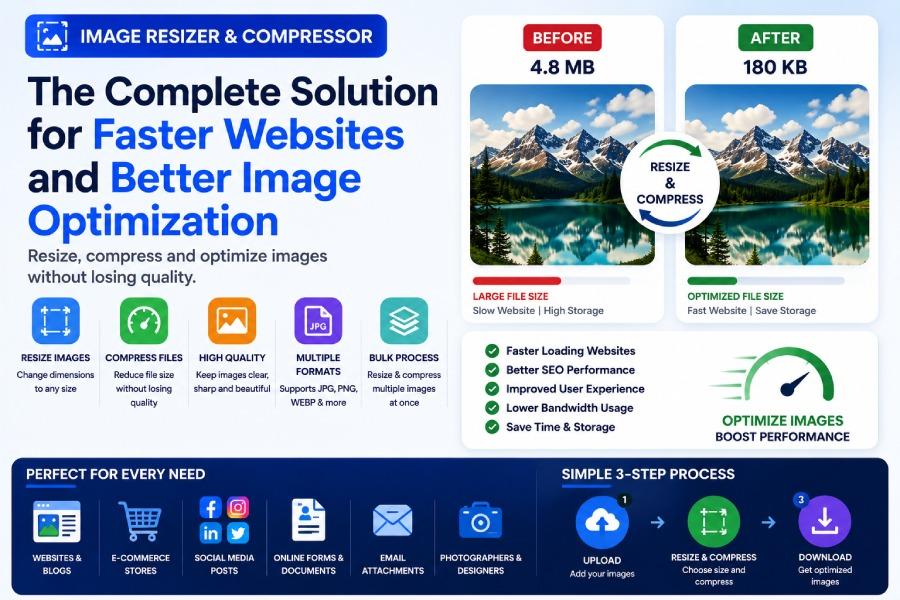
Images are one of the most important elements of the modern internet. They make websites attractive, improve user engagement, increase social media performance, and help businesses communicate visually with customers. Whether you are running a blog, managing an online store, building a company website, or posting on social media, images play a critical role in your success.
However, there is one common challenge that affects almost everyone working online: image size. Large images can slow down websites, create upload issues, increase storage requirements, and reduce overall performance. This is where an image resizer and compressor becomes one of the most valuable tools for digital users.
A combined image resizing and compression tool allows users to optimize photos efficiently without needing expensive software or technical skills. It helps reduce file size, adjust dimensions, improve upload speed, and maintain image quality for various online uses.
Why Image Optimization Matters
Most modern smartphones and cameras capture high-resolution images. While these images look great, they are often much larger than necessary for websites, social media, online forms, and digital marketing.
A photo taken from a smartphone may be 3MB, 5MB, or even larger. Uploading such files directly can create several issues:
Slow website loading speeds
Long upload times
Storage consumption
Email attachment limitations
Social media compression
Reduced user experience
Search engine performance issues
Image optimization solves these problems by resizing and compressing images before they are uploaded.
Instead of using oversized files, users can create optimized images that maintain visual quality while being significantly smaller in size.
What Is an Image Resizer and Compressor?
An image resizer and compressor combines two important image optimization functions.
The first function is resizing. Resizing changes the dimensions of an image by adjusting its width and height.
The second function is compression. Compression reduces the file size by optimizing image data without dramatically affecting visual quality.
When both functions are combined, users can create lightweight images that are easier to upload, faster to load, and more efficient for online use.
For example:
Original Image:
4000 × 3000 pixels
5MB file size
Optimized Image:
1200 × 900 pixels
250KB file size
The image still looks professional, but the file becomes much easier to manage.
Why Websites Need Optimized Images
Website performance directly affects user experience.
Visitors expect pages to load quickly. If a website is slow, users often leave before exploring the content. Large image files are one of the most common causes of slow-loading websites.
When website images are optimized:
Pages load faster
Bounce rates decrease
Mobile experience improves
Bandwidth usage decreases
Hosting resources are reduced
SEO performance improves
This is why website owners frequently use a free image resizer online before uploading images.
Instead of publishing large files, they prepare optimized versions that maintain quality while improving performance.
Resize Image Online for Better User Experience
A website visitor does not need a 5000-pixel-wide image to view content on a mobile phone.
Oversized images waste resources and slow down performance.
When users resize image online, they create dimensions that better match actual display requirements.
For example:
Blog featured images
Product photos
Portfolio images
Service page banners
Landing page graphics
Gallery images
All benefit from proper resizing before upload.
This creates a smoother browsing experience and improves website efficiency.
Image Compression for Faster Loading Speeds
Compression reduces image file size without requiring visible quality loss.
An image compressor online free tool removes unnecessary file data while keeping important visual details intact.
Smaller files load faster because browsers can download and display them more quickly.
This becomes especially important for:
Mobile visitors
E-commerce websites
Image-heavy blogs
Online portfolios
Educational platforms
Business websites
The faster your images load, the better your visitors' experience becomes.
Resize Image Without Losing Quality
Many people worry that image optimization will make their photos blurry.
Fortunately, modern tools can often resize image without losing quality when used correctly.
The key is balancing dimensions, compression settings, and intended use.
For example:
Website images rarely need maximum camera resolution.
Social media images do not require print-quality dimensions.
Online form photos only need sufficient clarity.
When resizing is performed properly, users can maintain excellent visual quality while dramatically reducing file size.
Why Businesses Need Image Optimization
Businesses rely heavily on visuals.
Product photos, advertisements, website banners, presentations, brochures, social media posts, and email campaigns all depend on images.
If these images are not optimized:
Websites become slow
Advertising creatives load slowly
Email attachments become too large
Storage costs increase
Customer experience suffers
Using an image resizer and compressor helps businesses create professional visuals while maintaining performance.
For online stores, optimized product images are particularly important because customers expect fast page loading and clear product visibility.
Social Media Image Optimization
Social media platforms automatically compress images after upload.
However, uploading an oversized image gives the platform less control over quality.
By optimizing images beforehand, users can create files that are already prepared for social media requirements.
This improves visual consistency and often results in better image quality after upload.
Platforms that benefit from optimized images include:
Twitter/X
Threads
YouTube
Professional-looking visuals improve engagement and brand perception.
Online Forms and Image Requirements
Many online forms require specific image dimensions and file sizes.
Common examples include:
Passport photos
ID verification
Student applications
Government forms
Job applications
Scholarship portals
Exam registration systems
Users often need to upload photos below certain file size limits.
An image resizer and compressor makes this process much easier.
Instead of repeatedly receiving upload errors, users can optimize images beforehand and submit successfully.
Bulk Image Resizer Online for Large Projects
Many users work with dozens or hundreds of images at once.
Examples include:
E-commerce product catalogs
Real estate listings
Photography portfolios
Blog content libraries
Marketing campaigns
Company image galleries
Resizing images individually becomes extremely time-consuming.
A bulk image resizer online allows users to optimize multiple images simultaneously.
This saves hours of work and keeps dimensions consistent across entire projects.
For businesses managing large image libraries, bulk optimization is often essential.
Benefits of Using a Free Online Tool
Online image optimization tools offer several advantages.
No Installation Required
Users can access the tool directly through a browser.
Easy to Use
No technical expertise is necessary.
Fast Processing
Images can be resized and compressed in seconds.
Works Across Devices
Desktop
Laptop
Tablet
Mobile phone
Cost Effective
Most tools provide basic optimization for free.
This accessibility makes online image optimization useful for both professionals and everyday users.
Common Mistakes People Make
Many users accidentally create image quality problems during optimization.
Common mistakes include:
Compressing images excessively
Using incorrect dimensions
Ignoring aspect ratio
Uploading unnecessarily large files
Choosing unsuitable image formats
Skipping previews before upload
By using a dedicated image optimization tool, users can avoid many of these issues.
Best Image Formats for Optimization
Choosing the correct format is important.
JPEG
Best for photographs
Smaller file sizes
Widely supported
PNG
Best for logos and graphics
Supports transparency
Usually larger file sizes
WebP
Excellent compression
Smaller file sizes
Great for websites
Modern browser support
Different situations require different formats, so selecting the correct one helps maximize results.
Why SEO Benefits from Optimized Images
Search engines increasingly consider user experience when evaluating websites.
Large images can slow page loading speed, which may affect SEO performance.
Optimized images help improve:
Page speed
Mobile performance
User engagement
Crawl efficiency
Core Web Vitals
While image optimization alone will not guarantee higher rankings, it contributes to a stronger overall website experience.
Image Optimization for Bloggers
Bloggers frequently use:
Featured images
Screenshots
Infographics
Charts
Tutorial graphics
Review images
Without optimization, these images can slow down the entire website.
By resizing and compressing images before publishing, bloggers create faster and more reader-friendly experiences.
This becomes increasingly important as content libraries grow.
Image Optimization for E-Commerce
Online stores depend heavily on product photography.
Customers expect:
Clear product images
Fast page loading
Smooth browsing
Mobile-friendly experiences
Optimized images help achieve all of these goals.
By using an image resizer and compressor, store owners can maintain attractive visuals without sacrificing performance.
Future of Image Optimization
As websites become more visual and mobile traffic continues growing, image optimization becomes even more important.
Users expect:
Instant loading
High-quality visuals
Mobile responsiveness
Smooth browsing
Efficient uploads
Businesses and creators who optimize images properly will continue delivering better digital experiences.
Final Thoughts
Images are essential for websites, businesses, social media, marketing campaigns, online forms, and digital communication. However, oversized image files can create serious performance issues.
Using an image resizer and compressor helps users create optimized visuals that load faster, upload easier, and maintain professional quality.
Whether you need a free image resizer online, want to resize image online, need to reduce image size online, or are looking for an image compressor online free, modern optimization tools provide a simple solution.
For businesses, bloggers, marketers, designers, students, and everyday internet users, image optimization remains one of the easiest ways to improve performance, efficiency, and user experience.

 English
 Arabic
 French
 Spanish
 Portuguese
 Deutsch
 Turkish
 Dutch
Dutch
 Italiano
 Russian
 Romaian
 Greek
Greek