


Museum WordPress Theme Features for Building Topic-Based Learning Experiences
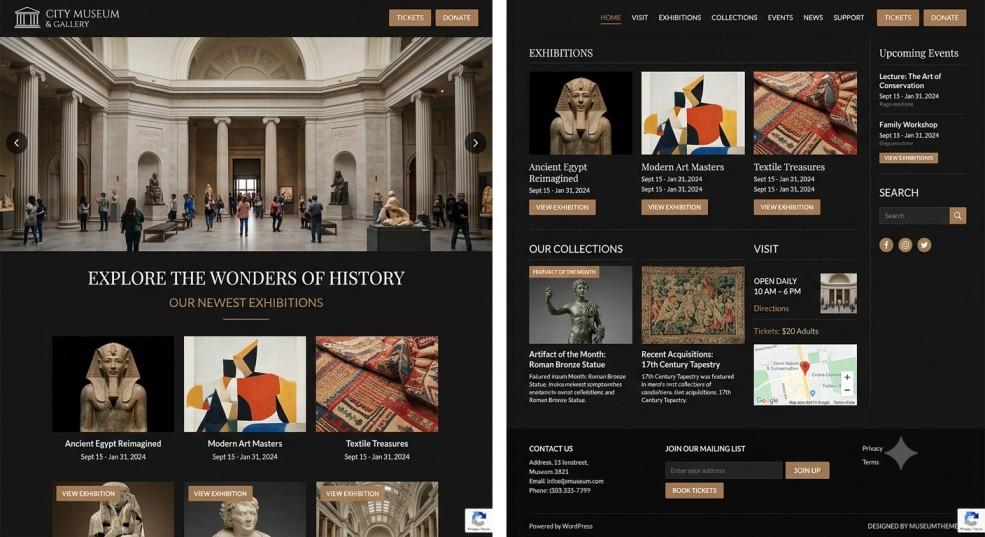
Museums today are not just about walking through halls and looking at old paintings or fossils behind glass. People want to learn something. They want to explore a topic, follow a timeline, understand how one artifact connects to another, and walk away knowing more than when they came in. This shift is happening online too. A museum's website is often the first stop for visitors, students, researchers, and curious minds who just want to explore a subject before or without ever stepping inside the building. A well-designed museum WordPress theme can support this experience by organizing collections, educational content, timelines, and related artifacts in a clear and engaging way.
This is where the right WordPress theme makes a real difference. A generic template with a homepage, an about page, and a contact form is not enough anymore. Museums need a website that can organize information by topic, not just by date or exhibit name. Let's look at what actually matters when building this kind of experience.
Why Topic-Based Learning Matters for Museums
Think about how people actually search for information. Someone doesn't usually search "Exhibit Hall 3." They search "ancient Egyptian burial practices" or "how steam engines changed transportation." They are looking for a subject, not a room number.
A topic-based structure lets your website match how visitors actually think. Instead of forcing people to know which gallery holds what, you let them explore by theme, era, culture, or idea. This keeps them on the site longer, helps them understand the bigger picture, and often brings them back for more.
The Problem With Traditional Museum Sites
Most older museum websites are built like brochures. There's a page for hours, a page for tickets, a page listing exhibits. It works, but it does not teach anything. Visitors leave with logistics, not knowledge. A good WordPress theme flips this by making learning paths part of the site's core design, not an afterthought.
Key Features to Look For in a Museum WordPress Theme
Not every theme is built for this kind of content-heavy, education-first approach. Here are the features that actually matter.
Flexible Content Structures
Look for a theme that supports custom post types and taxonomies. In simple terms, this means you can group your content by "topic," "time period," "culture," or "collection type" instead of being stuck with basic blog categories. This is the backbone of any topic-based learning experience.
Built-In Timeline and Story Layouts
Many museum themes now include timeline templates. These let you lay out historical events, artifact discoveries, or the evolution of a scientific idea in a visual, scrollable format. Instead of reading a wall of text, visitors can scroll through a story that unfolds step by step.
Rich Media Support Without Slowing Down the Site
Museums naturally have a lot of images, videos, and even 3D scans of artifacts. A good theme should handle all of this smoothly, with lazy loading and proper image compression, so the site stays fast even with heavy content. Nobody wants to wait 10 seconds for a page to load, no matter how interesting the artifact is.
Interactive Maps and Exhibit Locators
Some themes come with map integrations that let you tag artifacts or exhibits by location, whether that's a spot in the museum or a place on a world map tied to a historical event. This adds another layer to topic-based exploration, connecting geography with learning.
Search That Actually Understands Context
A strong internal search feature is not optional anymore. Visitors should be able to type in a general idea, like "Renaissance art techniques," and get relevant pages, artifacts, and articles, not just a list of pages with that exact phrase somewhere on them.
Accessibility Features Built In
Museums serve everyone, including visitors with visual, hearing, or mobility challenges. A quality theme should include accessible color contrast, screen-reader-friendly markup, and keyboard navigation support right out of the box, not as something you have to build from scratch.
Designing the Learning Path
Once you have the right theme, the real work is organizing your content into clear paths. Think of each "topic" as a mini course. For example, a natural history museum might build a path around "The Age of Dinosaurs," pulling together artifacts, articles, videos, and a timeline all under one theme.
Grouping Related Content
Use tags and categories wisely. If a visitor is reading about ancient pottery, they should easily find related artifacts, similar time periods, or connected cultures without having to search again from scratch.
Adding Educational Extras
Many museum themes support quizzes, downloadable guides, or short video explainers. These small additions turn a simple browsing session into something closer to a self-paced course, which is exactly what topic-based learning experiences aim for.
Mobile Experience Matters Just as Much
A large portion of museum website visitors are on their phones, sometimes even while walking through the actual museum. Your theme needs to look and function just as well on a small screen as it does on a desktop. Text should be easy to read, images should resize properly, and navigation menus should not turn into a confusing mess on mobile.
Conclusion
Building a museum website that supports topic-based learning is not about adding fancy effects or flashy design. It's about organizing information the way people naturally think and search, then giving them the tools to explore deeper. The right theme with flexible content types, timeline layouts, strong search, and mobile-friendly design can turn a simple museum website into a genuine learning space. If you're planning your next museum website project, it's worth spending time exploring premium WordPress Templates that already include these features, so you spend less time building from scratch and more time sharing your museum's story with the world.
Frequently Asked Questions
1. Do I need coding skills to set up a topic-based museum website?
Not really. Most modern museum WordPress themes come with drag-and-drop page builders and pre-made layouts, so you can organize content by topic without touching any code.
2. Can I use these theme features for a small local museum, not just big institutions?
Yes, absolutely. These features scale down well. Even a small local museum can use timelines, topic categories, and simple search to make their site more engaging.
3. Will adding lots of images and videos slow down my website?
It can, if the theme isn't optimized. Look for themes that support lazy loading and image compression so your site stays fast even with heavy media content.
4. How is a topic-based structure different from a regular exhibit-based website?
An exhibit-based site organizes content by physical location or gallery. A topic-based site organizes content by subject or theme, which matches how people actually search and learn online.
5. Are museum WordPress themes good for accessibility compliance?
Many quality themes include built-in accessibility features like proper contrast, screen-reader support, and keyboard navigation, but it's still worth checking each theme's accessibility documentation before choosing one.

 English
 Arabic
 French
 Spanish
 Portuguese
 Deutsch
 Turkish
 Italiano
 Russian
 Romaian
 Portuguese (Brazil)
 Greek