Glitch Text Generator: Create Cursed, Zalgo, and Cool Glitch Text Online
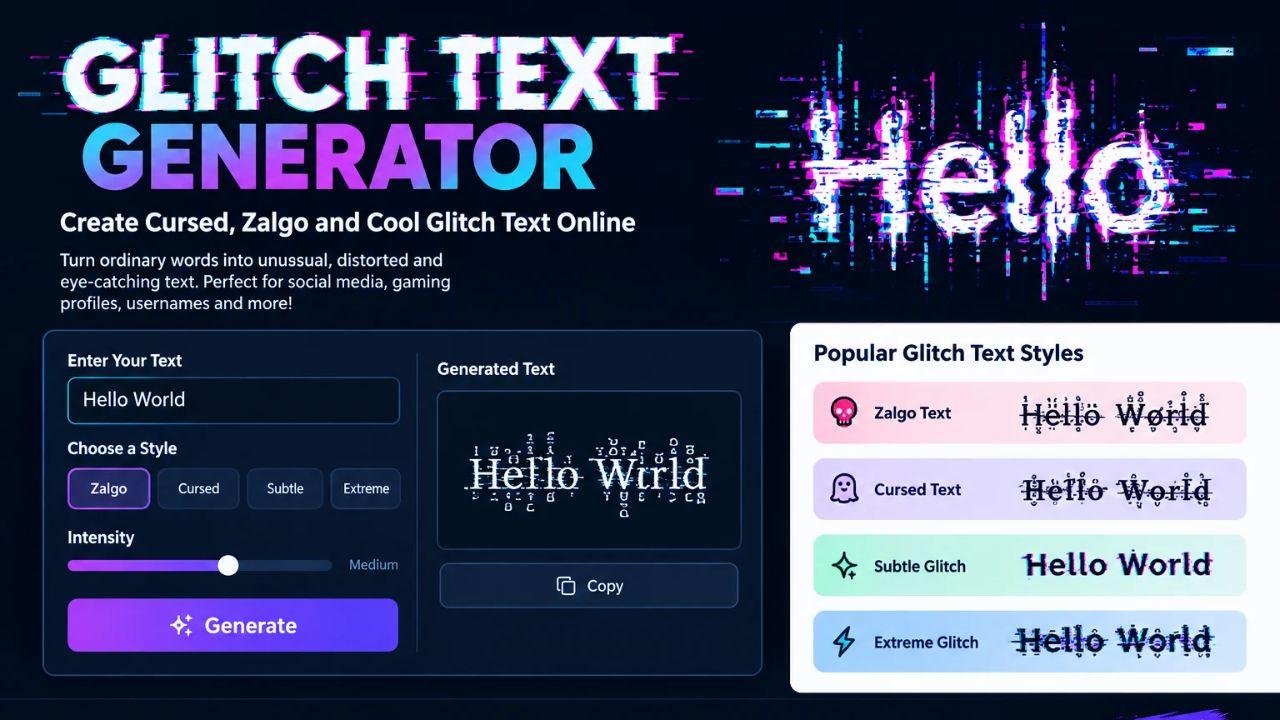
Have you ever wanted to make your username, social media bio, or gaming profile look different from everyone else's? A glitch text generator can help you transform ordinary words into unusual, distorted, and eye-catching text within seconds.
Glitch text is popular among gamers, social media users, content creators, and people who enjoy creative typography. Whether you want creepy Zalgo letters, cursed text, or a subtle digital glitch effect, you can create unique text without installing special fonts or software.
With a free online tool like GeneratorGlitchText.com , you can experiment with different glitch styles, customize the appearance of your text, and copy the result for use on supported platforms.
What Is a Glitch Text Generator?
A glitch text generator is an online tool that transforms normal text into a distorted or corrupted-looking style. It can make letters appear broken, chaotic, creepy, or as if they are affected by a digital error.
Many glitch text tools use Unicode combining characters to create this appearance. These characters can be placed above, through, or below ordinary letters, producing the familiar glitch or Zalgo effect.
For example, a simple word such as "Hello" can become something that looks unusual and spooky.
Unlike a traditional font generator, a Unicode-based glitch text generator does not necessarily require you to install a font. Instead, it creates a text string that you can copy and paste into compatible applications.
How to Create Glitch Text Online
Creating custom glitch text is simple, even if you have never used a text generator before.
Follow these steps:
-
Open GeneratorGlitchText.com .
-
Enter the word, username, or phrase you want to transform.
-
Choose a glitch preset or adjust the available intensity settings.
-
Preview the generated text and experiment with different styles.
-
Copy your favorite result and paste it into your preferred application.
You can try different combinations until you find a style that matches your profile, gaming identity, or creative project.
Popular Glitch Text Styles
Different glitch styles can create different moods. Some are designed to look creepy, while others are better suited to modern digital designs.
1. Zalgo Text
Zalgo text is one of the most recognizable forms of glitch typography. It uses stacked combining marks to make letters appear distorted, stretched, or corrupted.
This style is commonly used for horror-themed posts, creepy messages, gaming profiles, and internet memes.
2. Cursed Text
Cursed text gives ordinary words an unsettling appearance. It is useful for creating spooky captions, funny messages, and unusual usernames.
You can experiment with different levels of distortion to make your text look mildly strange or extremely chaotic.
3. Subtle Glitch Text
Not every situation requires an extreme effect. A subtle glitch style adds a small amount of distortion while keeping the original word relatively readable.
This can work well for short bios, display names, and creative social media captions.
4. Extreme Glitch Text
Extreme glitch text uses a heavier combination of visual distortions. It can make words look as though they are breaking apart or being corrupted by a computer error.
This style is particularly suitable for horror projects, digital artwork, and experimental typography.
Where Can You Use Glitch Text?
A glitch text generator can be useful in many online situations. However, the appearance and compatibility of the generated characters may vary between platforms.
Social Media Profiles
Use glitch text to give your Instagram bio, TikTok profile, or Facebook posts a distinctive appearance. Short phrases and display names are usually easier to read than long blocks of heavily distorted text.
Discord Messages and Usernames
Discord users often experiment with unusual Unicode characters to customize messages, server identities, and profile descriptions.
A glitch text generator can help you create a distinctive style without manually adding combining characters.
Gaming Usernames
Gamers can use glitch text to experiment with creative names for gaming profiles, clans, and online communities.
Before using a generated name, check the game's character restrictions. Some games may reject certain Unicode characters or display heavily distorted text incorrectly.
Memes and Creative Content
Glitch text can also add personality to memes, horror stories, digital artwork, and short-form content.
For example, a distorted word can help communicate a mysterious, spooky, or corrupted-computer theme.
Benefits of Using an Online Glitch Text Generator
An online glitch text generator offers several advantages for people who want to customize their text quickly.
-
Easy to use: Create unusual text without advanced design skills.
-
Quick results: Generate different text styles in a few moments.
-
Copy-and-paste convenience: Transfer compatible output into other applications.
-
No font installation required: Unicode-based output does not depend on installing a custom font.
-
Creative flexibility: Experiment with different levels of distortion for different purposes.
-
Mobile and desktop access: Use a browser-based tool on a compatible phone, tablet, or computer.
These features make glitch text tools useful for casual users as well as creators who want to experiment with digital typography.
Glitch Text vs. Glitch Fonts: What Is the Difference?
Although the terms are often used interchangeably, glitch text and glitch fonts are not exactly the same.
A glitch font changes the visual appearance of characters through a typeface or graphic treatment. Depending on the design, it may require a specific font or an image-based effect.
A Unicode glitch text generator works differently. It adds or uses special text characters to create a distorted appearance. This allows the output to be copied into applications that support those characters.
However, Unicode glitch text does not look identical on every device. Different apps, browsers, and operating systems may render combining characters differently.
If you need a consistent design for a poster or video thumbnail, an image-based glitch effect may provide more control.
Tips for Getting Better Results
To make your generated text more useful, keep these practical tips in mind:
-
Use short words or phrases for heavily distorted styles.
-
Choose lighter effects when readability matters.
-
Test the copied text on the platform where you intend to use it.
-
Avoid using unusual characters in passwords, email addresses, or important links.
-
Try several variations before choosing a final username or caption.
These simple steps can help you create text that looks distinctive without becoming difficult to read.
Frequently Asked Questions
Is a glitch text generator free to use?
Many online glitch text generators offer free text generation. Check the individual website for its current features, restrictions, and terms.
What is Zalgo text?
Zalgo text is a distorted text style created by stacking combining characters around ordinary letters. The result often looks chaotic, creepy, or corrupted.
Can I copy and paste glitch text?
Yes. Unicode-based glitch text can generally be copied and pasted into applications that support the characters used. The final appearance may differ between platforms.
Does glitch text work on Instagram and Discord?
Glitch text can work in supported text fields on Instagram and Discord. However, certain characters or heavy combinations may not display as expected.
Can I use glitch text for gaming usernames?
You can experiment with glitch text for gaming usernames, but compatibility depends on the game. Check character limits and supported symbols before changing your username.
Do I need to download a font to create glitch text?
No. A Unicode-based glitch text generator can create copyable text directly in your browser without requiring a separate font installation.
Conclusion
A glitch text generator is a simple way to transform ordinary words into creative, distorted typography. From creepy Zalgo text and cursed messages to unusual gaming usernames and social media bios, these tools offer plenty of opportunities to experiment with different styles.
If you want to create your own designs, visit GeneratorGlitchText.com and try different glitch effects. Customize your text, compare the results, and copy a style that suits your next profile, post, or creative project.

 English
 Arabic
 French
 Spanish
 Portuguese
 Deutsch
 Turkish
 Dutch
 Russian
 Romaian
 Portuguese (Brazil)
 Greek